 Home
Explore Vithanco's Rich Library of Notations
The Prerequisite Tree (PRT) Notation
Home
Explore Vithanco's Rich Library of Notations
The Prerequisite Tree (PRT) NotationThe Prerequisite Tree (PRT) Notation
Estimated reading time: 2 minutes.
Why use Prerequisite Trees (PRTs)?
PRTs are a planning tool to achieve a known goal/objective. It is a breakdown of the steps to get you where you want to be. Each step is based on an identified "Obstacle" that you will overcome by a "state" which is again nothing else as an (intermediate) objective.
PRTs are useful because of their simplicity and because they embody a simple principle from Stephen Cowley: "Start with the End in Mind".
PRT Notation Description
The diagram below describes the Notation. One starts with the Objective and uses necessary condition thinking to define all known immediate obstacles that one sees from achieving that particular objective. Then for each obstacle, one considers the intermediate objectives that would help you to overcome the obstacle. Then you consider what obstacles are keeping you from achieving each of the intermediate objectives. And so forth, until each step from now to the Objective is identified.
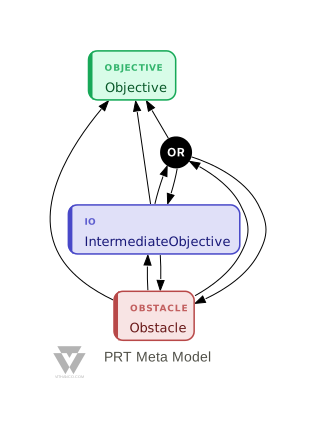
The PRT Notation
| Node Type | Description | Successors |
|---|---|---|
| Objective | The Objective that you really care about | - |
| Obstacle | One of potentially many obstacles that you need to overcome to meet an Objective | Objective, Intermediate Objective, (OR) |
| Intermediate Objective | An objective that if achieved will overcome the following Obstacle | Obstacle (OR) |
| OR | As a necessary condition all incoming arrows normally mean that all are necessary. You can change this with an OR | all other Nodes Types |
Background Information on PRT Notation
PRT diagrams were developed as part of the Theory of Constraints by E. Goldratt. More on the Theory of Constraints can be found here.
Try PRT Yourself
Create and visualize your own Prerequisite Tree diagram right here in your browser. Edit the VGL (Vithanco Graph Language) text on the left and click "Render" to see your diagram:
Tip: Use Ctrl+Enter (or Cmd+Enter on Mac) to quickly render your graph while editing.
Want to learn more about the VGL syntax? Check out the complete VGL Guide for detailed documentation on creating graphs in text format, including syntax reference and examples for all supported notations.