 Home
Explore Vithanco's Rich Library of Notations
The Transition Tree (TRT) Notation
Home
Explore Vithanco's Rich Library of Notations
The Transition Tree (TRT) NotationThe Transition Tree (TRT) Notation
Estimated reading time: 3 minutes.
What is a Transition Tree (TRT)?
A Transition Tree (TRT) is a cause-and-effect logical tool that answers the question: "How to cause the change?" It translates the desired future state (as specified in the FRT) into actionable steps and expands elements from the PRT to overcome anticipated obstacles.
The TRT is essentially a detailed roadmap that connects: 1. Actions - What we must do 2. Intermediate Effects (IEs) - What result each action produces 3. Necessary Conditions (NCs) - Why the action is needed for the next step 4. Final Objective - The desired outcome
How to Use a TRT
Follow this 6-step approach:
- Define the Objective (End State) - Clearly state the desired outcome (e.g., reduce project lead time by 30%).
- Assess Current Reality - Identify the current state and gaps vs. desired outcome.
- List Required Conditions - Break down what must be achieved step by step to reach the end state.
- Formulate Actions - Define specific actions to satisfy each necessary condition.
- Connect with Cause-Effect Logic - Build "IF we do X action → THEN Y effect will happen" relationships. Ensure no gaps between steps (logical sufficiency).
- Validate and Sequence - Check clarity, feasibility, and completeness. Sequence actions so dependencies are respected.
Cause-Effect Logic Example:
- IF we implement daily stand-up meetings
- THEN we'll identify obstacles earlier
- WHICH MEANS faster problem resolution
- LEADING TO reduced project lead time
Benefits of Using a TRT
- Clarity & Alignment - Everyone sees how actions connect to goals.
- Bridges Strategy & Execution - Translates "what to change" into "how to change" concretely.
- Prevents Resistance - Logical cause-effect reduces doubts and builds buy-in.
- Risk Mitigation - Anticipates obstacles and ensures necessary conditions are addressed.
- Focus - Prevents wasted effort on irrelevant or low-impact actions.
Challenges if TRT is NOT Used
If an organization skips the TRT:
- Execution Gaps - Strategy remains at a "wish level" without a clear roadmap.
- Misalignment - Teams interpret goals differently, leading to conflicting actions.
- Hidden Assumptions - Critical conditions may be overlooked.
- Resistance to Change - People don't see the logical link, leading to doubt or pushback.
- Rework & Wasted Effort - Actions taken that don't lead to the desired outcome.
- Low Sustainability - Improvements may fade without structured follow-through.
The TRT is the "bridge" from vision to execution. Without it, organizations often end up with brilliant strategies that never materialize in practice.
TRT Notation Description
The diagram below describes the Notation's grammar. TRT is an implementation planning tool that answers "HOW TO CAUSE the change?" by providing step-by-step actions needed to implement changes. It shares node types with CRT/FRT but focuses on the detailed action sequence.
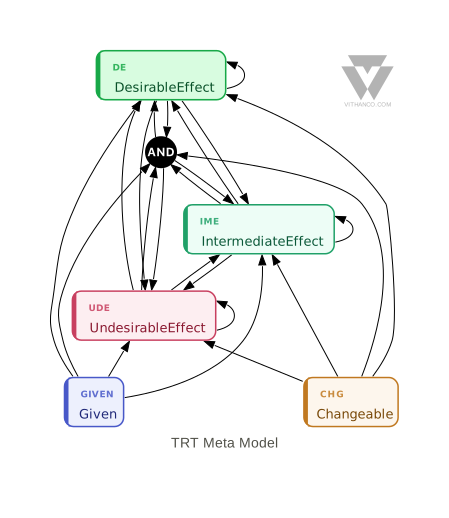
The Node Types in detail:
| Node Type | Description | Successors |
|---|---|---|
| Desirable Effect | Goal outcomes we want to achieve. These are the target states that our actions aim to produce. | All Effects incl. 'And' |
| Intermediate Effect | Stepping stone outcomes from actions. Neither positive nor negative on their own, they connect actions to final effects. | All Effects incl. 'And' |
| Undesirable Effect | Current state problems being addressed. In TRT, these help track what we're trying to eliminate. | All Effects incl. 'And' |
| Given | Unchangeable facts and constraints. These are preconditions beyond your sphere of influence. | All Effects incl. 'And' |
| Changeable | Actions we can take to cause change. These are the specific steps we will implement. | All Effects incl. 'And' |
| And Junctor | Indicates multiple conditions required together for an effect. Connects two causes that must both be present. | All Effects (excl. 'And') |
Background Information
TRT diagrams were developed as part of the Theory of Constraints Thinking Processes by E. Goldratt.
Try TRT Yourself
Create and visualize your own Transition Tree diagram right here in your browser. Edit the VGL (Vithanco Graph Language) text on the left and click "Render" to see your diagram:
Tip: Use Ctrl+Enter (or Cmd+Enter on Mac) to quickly render your graph while editing.
Want to learn more about the VGL syntax? Check out the complete VGL Guide for detailed documentation on creating graphs in text format, including syntax reference and examples for all supported notations.