 Home
Explore Vithanco's Rich Library of Notations
The Arithmetic Notation
Home
Explore Vithanco's Rich Library of Notations
The Arithmetic NotationThe Arithmetic Notation
Estimated reading time: 6 minutes.
Why use Arithmetic?
Most Vithanco Notations help you structure an argument, a plan or a system. Arithmetic is different: it is a small, complete notation for a single equation, built for a kids' maths game. Numbers are nodes, the four operators are nodes, and an = node asserts that everything meeting there has the same value — and tells you whether it does.
It is deliberately tiny. There is no chaining of operators, no brackets and no algebraic variables. Just numbers, one operator at a time, and equality.
Use it for:
- Building a simple equation as a diagram: two operands, one operator, one result.
- A puzzle where one connection is missing and a value must be chosen to complete it correctly.
- Asserting that two expressions are equal — for example
7 − 4 = 2 + 1— without naming which side is "the answer".
How it Works
Arithmetic rests on one idea that is unusual if you are used to writing equations as text: = is a node, not a symbol between two halves. It works like the AND junctor in an Attack-Defense Tree or the OR junctor in a Current Reality Tree — a place where several things meet and something is asserted about all of them at once. Here the assertion is these are all the same number.
That is what lets 7 − 4 = 2 + 1 be drawn with no answer node at all: two operators, one Equals, nothing privileged as "the result".
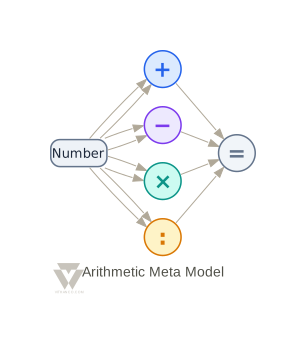
The Building Blocks
| Node Type | Description | Successors |
|---|---|---|
| Number | A value — either given, or filled in as a candidate answer. Its label is its value. | Plus, Minus, Times, Divide |
| Plus | Addition: takes two operands, produces their sum. | Equals |
| Minus | Subtraction: takes two operands, produces their difference. | Equals |
| Times | Multiplication: takes two operands, produces their product. | Equals |
| Divide | Division: takes two operands, produces their quotient. | Equals |
| Equals | Asserts that everything connected to it — plus its own typed value, if any — shares the same value. | None |
The operators are drawn as coloured glyph circles (+, −, ×, :) rather than boxes, because there is no prose in them to frame. For the same reason you cannot rename an operator by double-clicking it: it has no user text.
Each operator has three edge types — a first operand, a second operand, and a result:
| Edge Type | Description | From | To |
|---|---|---|---|
plus_first_operand / plus_second_operand |
The two numbers added. | Number | Plus |
plus_result |
The sum, asserted equal at the Equals node. | Plus | Equals |
minus_first_operand |
The number subtracted from. | Number | Minus |
minus_second_operand |
The number subtracted. | Number | Minus |
minus_result |
The difference, asserted equal at the Equals node. | Minus | Equals |
times_first_operand / times_second_operand |
The two factors. | Number | Times |
times_result |
The product, asserted equal at the Equals node. | Times | Equals |
divide_first_operand |
The dividend. | Number | Divide |
divide_second_operand |
The divisor. | Number | Divide |
divide_result |
The quotient, asserted equal at the Equals node. | Divide | Equals |
An operator accepts at most one first operand and one second operand, and produces at most one result. Nothing bounds what arrives at an Equals node, and nothing is required: an incomplete puzzle is the normal mid-play state, and several results meeting at one Equals is precisely what the node is for.
Naming the Operand Edges
Everywhere else in VGL you can usually leave the edge type out and let it be inferred from the node types at each end. Arithmetic is the exception on the operand side: Number → Plus matches two edge types, so VGL cannot tell a first operand from a second one.
edge two -> plusOp;                       // ambiguous — rejected
edge two -> plusOp: plus_first_operand;   // explicit — fine
Result edges are unambiguous (Plus → Equals has only one type), so edge plusOp -> eq; works. Writing it out in full is still clearer.
A First Equation
The Equals node carries the expected answer as its own label. Type into it to set the target.
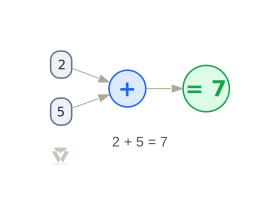
vgraph arithmeticFirstEquation: Arithmetic "2 + 5 = 7" {
    node two: Number "2";
    node five: Number "5";
    node plusOp: Plus;
    node eq: Equals "7";

    edge two -> plusOp: plus_first_operand;
    edge five -> plusOp: plus_second_operand;
    edge plusOp -> eq: plus_result;
}
Graphs flow left to right, so the diagram reads the way the equation does and ends on the =.
Right and Wrong
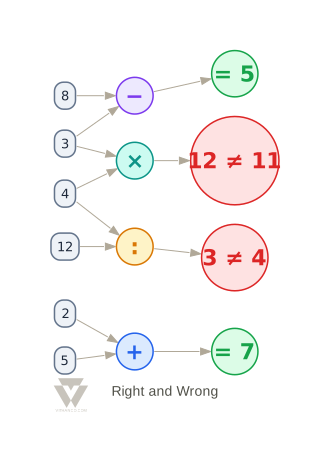
The Equals node is the feedback mechanism. It has three states:
- Neutral (grey) — not enough is connected yet to judge. If it has its own expected value it shows it, as
= 7. - Correct (green) — everything meeting there agrees. Shows the agreed value.
- Incorrect (red) — they disagree. Shows
computed ≠ expected, so the two numbers appear in a fixed, readable order rather than an arbitrary one.
Here are all four operators, two right and two wrong:
vgl-render id=arithmetic-both-sides alt="7 − 4 = 2 + 1 drawn with two operators meeting at one Equals node" caption="7 − 4 = 2 + 1 — two operators meet at one Equals node, and neither side is 'the answer'" class="img-std" vgraph arithmeticBothSides: Arithmetic "7 − 4 = 2 + 1" { node seven: Number "7"; node four: Number "4"; node two: Number "2"; node one: Number "1";
node minusOp: Minus; node plusOp: Plus;
node eq: Equals;
edge seven -> minusOp: minusfirstoperand; edge four -> minusOp: minussecondoperand; edge minusOp -> eq: minus_result;
edge two -> plusOp: plusfirstoperand; edge one -> plusOp: plussecondoperand; edge plusOp -> eq: plus_result; }
Both sides evaluate to 3, so the node turns green and shows `= 3`. Had they disagreed, it would have shown the two computed values either side of a `≠`.

## Quality Checks

Arithmetic ships one quality check: **division by zero**. If a Divide node has both operands connected and the divisor is zero, Vithanco reports a warning naming the node. An operator that is simply missing an operand is *not* flagged — that is a puzzle mid-play, not a mistake.

## Try it Yourself

Edit the VGL below and click "Render". Try changing an expected answer to see a green node turn red, or delete an operand edge to watch the node go neutral:

**Tip:** Use Ctrl+Enter (or Cmd+Enter on Mac) to quickly render your graph while editing.

Want to learn more about the VGL syntax? Check out the complete **[VGL Guide](/tools/vgl)** for detailed documentation on creating graphs in text format, including syntax reference and examples for all supported notations.