 Home
Explore Vithanco's Rich Library of Notations
The C4 Model Notation
Home
Explore Vithanco's Rich Library of Notations
The C4 Model NotationThe C4 Model Notation
Estimated reading time: 10 minutes.
The C4 model describes a software system at four levels of zoom, so that every audience — executives, architects, developers — sees the same architecture at the level of detail it needs. It is the most widely used way to draw software architecture that isn't UML, and Vithanco supports it as a built-in Notation.
What Vithanco adds is this: the four levels are not four diagrams. They are one graph, drawn at different fold states. Collapse the group around a system and you are looking at the System Context view; open it and you are looking at the Container view. Nothing is duplicated, so nothing can drift out of step.
Why use the C4 Model?
C4 answers the question every new joiner, reviewing architect and nervous stakeholder asks — what is this thing, and how does it hang together? — without demanding that they learn a modelling language first. It works because it fixes just two things: a small vocabulary of elements, and four levels of zoom.
| Level | Question it answers | Audience |
|---|---|---|
| 1. System Context | What is this system, who uses it, and what does it talk to? | Everybody, technical or not |
| 2. Container | What applications and datastores make up the system? | Architects, developers, operations |
| 3. Component | What are the major building blocks inside one container? | Developers working in that container |
| 4. Code | How is one component implemented? | Rarely drawn — see below |
Use C4 when you need to explain a system's place in its environment, show the deployable pieces it is built from, or zoom into one of those pieces without losing the reader. It is particularly strong for onboarding, because a single map stays legible from the boardroom to the codebase.
When NOT to use C4
C4 shows what you built. It never shows why. That is by design — and it is why C4 diagrams age badly on their own: a year later, nobody can remember which options were considered, or which constraint forced the odd-looking split between two containers.
So reach for a different Notation when the question changes:
- Why is it built this way? Use an IBIS Diagram to capture the question, the options and the arguments for and against each one. C4 has no vocabulary for a rejected alternative; IBIS is made of them.
- What do these words mean? Use a Concept Map to pin down the domain vocabulary that the boxes are named after, before the same word ends up meaning three things in three containers.
- What happens when this fails? Use a Causal Loop Diagram to reason about how load, retries and queues feed back on each other. C4 is a structural picture, not a behavioural one.
For the small stuff, you do not have to leave the diagram at all. The Annotation extension works with C4, so you can hang a note on any element:
vgraph banking: C4, Annotation "Internet Banking System" {
    node api: SoftwareSystem "Payments API";
    node note: Annotation "Split from the web app in 2024 — see ADR-14";
    edge api -> note;
}
That is the right home for a passing remark. When the remark grows into an argument, move it to IBIS.
The C4 Notation in Vithanco
The diagram below shows every element type at once, with the name you type in VGL as its label. The visual language does most of the work: blue gets lighter as you zoom in, a cylinder means datastore, and a notch on top means person. An element you do not own is just a colour on the node — grey here.
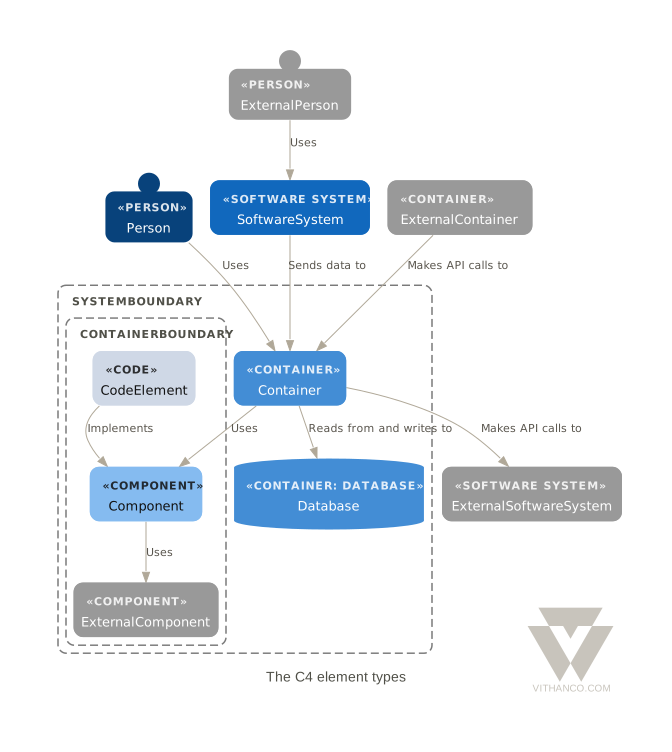
Unlike the other Notations on this site, there is no meta model picture here. C4 permits relationships between almost any pair of elements, so a drawing of every permitted pair is a wall of arrows that teaches nothing. The table does the job better.
| Node Type | Description |
|---|---|
Person |
A human user of the system — a customer, an administrator, a support agent. |
SoftwareSystem |
A whole system, drawn as a single box. The unit of the System Context view. Detailed by containers and databases. |
Container |
A separately deployable or runnable thing: a web app, an API, a mobile app. Detailed by components. |
Database |
A Container that stores data, drawn as a cylinder. |
Component |
A major structural building block inside one container. Detailed by code elements. |
CodeElement |
A class, interface or module inside a component. |
C4 also distinguishes external elements — the people and systems you do not own or control. Vithanco does not make that a type of its own: write the element as usual and colour it, for example node cbs: SoftwareSystem "Core Banking System" [backgroundColor: "#e8710a"];.
A note on level 4: C4 itself treats the Code level as optional, and Simon Brown advises against drawing it by hand, since an IDE or a documentation generator produces it more accurately and keeps it current. CodeElement exists for when you want it, and the last view below shows what it looks like.
Relationships
A relationship is a directed edge, and its label carries the meaning — "Uses", "Reads from and writes to", "Makes API requests to", "Sends e-mails to". There is no taxonomy of edge types to memorise, and a file never names one: the pair of element types already says which relationship it is.
edge backend -> database "Reads from and writes to";
Read the label together with the direction, and each edge becomes a sentence: the Backend reads from and writes to the Database. If a relationship needs a paragraph rather than a phrase, that is a signal it belongs in an IBIS Diagram, not on the arrow.
One rule is worth knowing: edges join elements, never boundaries. A relationship of a system starts at one of its details — a container or a component. Fold the system and its relationships gather onto its card, shown as ×3 when three meet.
Two words worth getting straight
C4's vocabulary has one trap in it, and the rest of this page depends on avoiding it.
- Container is an element — a deployable unit like a web application or a service. It is not the box drawn around things. This catches people who arrive from the Docker sense of the word, and it catches people who assume the biggest box on the diagram must be the container.
- Group is the box around things. In VGL you write
group, exactly as in every other Notation. Give the group the type of the element it stands for —group ibs: SoftwareSystem "Internet Banking System" { … }— and you have a detailed element: folded, it is the element's card; unfolded, it is a dashed boundary around its details. A plainOrganisationgroup draws the boundary around the people and systems an organisation owns.
So the same words, group backend: Container "Backend", are the container and the box around its components. That is the whole trick behind the zoom levels.
One model, four views
Here is the whole architecture — Simon Brown's Internet Banking System, the canonical C4 example, adapted from c4model.com and modelled all the way down to the code. It is written once. Its skeleton looks like this:
vgraph banking: C4 "Internet Banking System" {
    node customer: Person "Personal Banking Customer";

    group bigBank: Organisation "Big Bank" {
        node cbs: SoftwareSystem "Core Banking System" [backgroundColor: "#e8710a"];

        group ibs: SoftwareSystem "Internet Banking System" {
            isfolded: false;
            node ui: Container "UI";
            node database: Database "Database";

            group backend: Container "Backend" {
                isfolded: false;
                node signInApi: Component "Sign In API";
                node securityComponent: Component "Security Component";
            };
        };
    };

    edge customer -> ui "Views account balances and makes payments using";
    edge ui -> signInApi "Makes sign in requests to";
    edge signInApi -> securityComponent "Validates credentials using";
    edge securityComponent -> database "Reads from and writes to";
}
Each of the four C4 diagrams is a vview of that one file. A view decides what to show — which group to focus on, and which element type to fold. The Context view, for example, is:
vview context "System Context View: Internet Banking System" [derivedEdges: false] {
    include group ibs;
    expand 1;
    folded node type: SoftwareSystem;
}
folded node type: SoftwareSystem means draw every software system as a single card. Change it to Container and you are one level lower. Nothing is drawn twice, so nothing can drift.
Level 1 — the System Context view
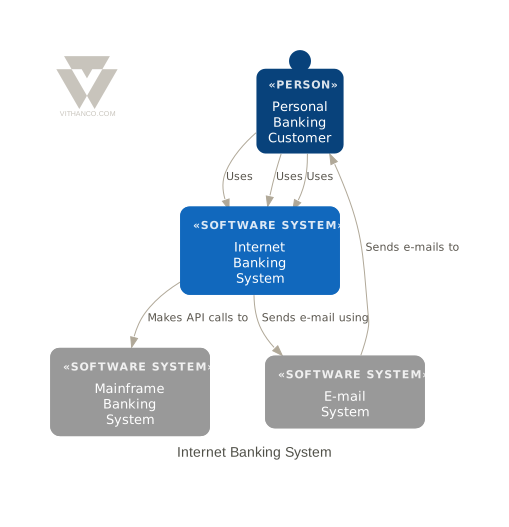
vgl-render id=c4-container-view src=notations/c4-model/banking.vgl view=containers alt="The Internet Banking System drawn as a C4 Container view" caption="Level 2 — the Container view. The Backend is folded, so it draws as a single container card." class="img-std"
Fold containers instead of systems, and the system opens: the UI, the static content, the datastores and the backend appear, with the relationships between them.

### Level 3 — the Component view
vgl-render id=c4-component-view src=notations/c4-model/banking.vgl view=components alt="The Backend drawn as a C4 Component view" caption="Level 3 — the Component view. The Backend is opened up to show its components." class="img-std"
Focus on the Backend and fold components, and you see the building blocks inside it and who calls whom. The relationships did not have to be redrawn; they were always between these components, and the view was simply hiding them.

### Level 4 — the Code view
vgl-render id=c4-code-view src=notations/c4-model/banking.vgl view=code alt="The Core Banking System Adapter drawn as a C4 Code view" caption="Level 4 — the Code view. One component, opened up to the classes and interfaces that implement it." class="img-std"
As advised above, you would rarely draw this by hand — but when you do want one component explained down to its classes, the model already holds them. A further view, `landscape`, shows every software system at once.

Four levels, four views, one source of truth. Change a container's name once and all of them agree, because there is only one place where the name is written down.

## What Vithanco checks for you

The C4 Notation checks that every element sits in the thing that details it. A `Container` or `Database` at the top level of the diagram, outside any `SoftwareSystem`, is almost always a modelling slip — it belongs to *some* system — and the same holds for a `Component` outside a container and a `CodeElement` outside a component. The check runs every time the diagram is rendered.

You can see this for yourself in the editor below: move the `node database: Database "Database";` line out of the `group ibs` block and render, and the database is flagged in the source.

## Try C4 yourself

The editor below is seeded with the full Internet Banking model and its views. Fold and unfold a group in place, or change what a view folds: in the `containers` view, replace `folded node type: Container;` with `folded node type: SoftwareSystem;` and you are looking at the System Context.

<iframe src="/vgraph/index.html?src=/notations/c4-model/banking.vgl" height="750" style="display:block;box-sizing:border-box;position:relative;z-index:1;width:calc(min(100vw, 1300px) - 4rem);max-width:none;margin:20px 0;border:1px solid #e0e0e0;border-radius:8px;" title="VGraph Interactive C4 Editor"></iframe>

**Tip:** Use Ctrl+Enter (or Cmd+Enter on Mac) to quickly render your graph while editing.

Want to learn more about the VGL syntax? Check out the complete **[VGL Guide](/tools/vgl)** for detailed documentation on creating graphs in text format, including syntax reference and examples for all supported Notations.

## Background

The C4 model was created by **Simon Brown** in the 2010s as a lightweight, notation-independent way to describe software architecture, distilling ideas from UML and Philippe Kruchten's "4+1" architectural view model into four simple levels. The name comes from those levels: **C**ontext, **C**ontainers, **C**omponents, **C**ode.

The Internet Banking System used throughout this page is Brown's own teaching example, adapted here to VGL.

- [The C4 model for visualising software architecture](https://c4model.com) — the official site
- [C4 model](https://en.wikipedia.org/wiki/C4_model) on Wikipedia