 Home
Explore Vithanco's Rich Library of Notations
Timeline Notation
Home
Explore Vithanco's Rich Library of Notations
Timeline NotationTimeline Notation
Estimated reading time: 4 minutes.
Why use Timelines?
Timelines visualise how events across different domains relate to each other chronologically and causally. Unlike a simple list of dates, a Timeline diagram lets you lay out parallel tracks — countries, teams, systems — and see at a glance what happened at the same time and what influenced what.
Common use cases include:
- Historical analysis across multiple countries or regions
- Project management with parallel workstreams
- Product roadmaps with multiple feature tracks
- Incident timelines showing events across different systems
How it Works
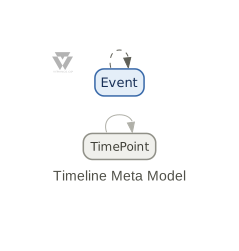
The Timeline notation rests on one key idea: alignGroup. Any nodes that share the same alignGroup value are placed at the same position in the layout — think of it as pinning them to the same column (or row, depending on direction). This is what creates the visual alignment of a timeline.
The Building Blocks
| Node Type | Description | Successors |
|---|---|---|
| TimePoint | An axis marker labelling a point in time (e.g., "1805", "Q3 2025"). Optional — alignGroup alone is enough for alignment. |
TimePoint |
| Event | A generic event. Extend with vnotation for domain-specific types (Battle, Release, Incident, …). |
Event |
| Edge Type | Description | From | To |
|---|---|---|---|
| sequence | Creates the time axis by connecting TimePoints in order. Thin gray arrow. | TimePoint | TimePoint |
| influence | Shows a causal or dependency link between events. Dashed line, constraint=false so it doesn't distort alignment. |
Event | Event |
Groups create parallel tracks. Each group renders as a labelled cluster box. Groups are optional — simple timelines work without them.
A Basic Example
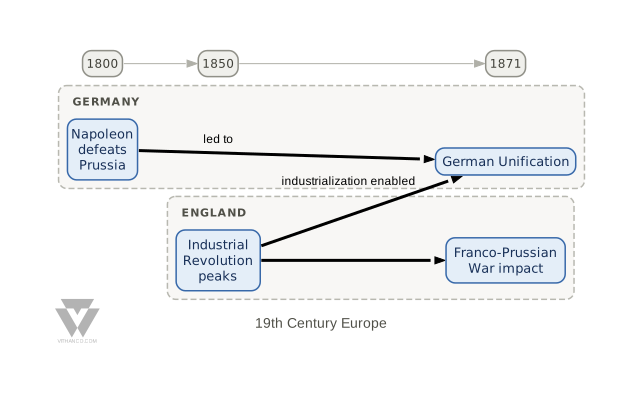
vgraph myTimeline: Timeline "19th Century Europe" {
    node t1800: TimePoint "1800" [alignGroup: "1800"]
    node t1850: TimePoint "1850" [alignGroup: "1850"]
    node t1871: TimePoint "1871" [alignGroup: "1871"]
    edge t1800 -> t1850: sequence
    edge t1850 -> t1871: sequence

    group germany "Germany" {
        node e1: Event "Napoleon defeats Prussia" [alignGroup: "1800"]
        node e2: Event "German Unification" [alignGroup: "1871"]
    }
    group england "England" {
        node e3: Event "Industrial Revolution peaks" [alignGroup: "1850"]
        node e4: Event "Franco-Prussian War impact" [alignGroup: "1871"]
    }

    edge e1 -> e2: influence "led to"
    edge e3 -> e2: influence "industrialization enabled"
    edge e3 -> e4: influence
}
Notice that every event carries [alignGroup: "1800"] (or whichever year). That single attribute is what lines them up with the corresponding TimePoint.
Changing Direction
The default layout is left-to-right — time flows horizontally. You can switch to any of the four directions (topToBottom, bottomToTop, leftToRight, rightToLeft) using a vnotation block:
vnotation VerticalTimeline extends Timeline {
    layout: topToBottom
}
This is especially useful when you want a vertical timeline or when your labels are wide.
Custom Event Types with vnotation
The base notation gives you generic TimePoint and Event types. For any real project you'll want domain-specific types — battles and treaties for a war timeline, releases and incidents for a DevOps timeline, etc.
Use vnotation extends Timeline to add custom node types, edge types, and change the layout in one block:
vnotation WarTimeline extends Timeline {
    layout: topToBottom
    node type: Battle [nodeStyle: withCategory, color: "#883333", category: "Battle"]
    node type: Treaty [nodeStyle: withCategory, color: "#339933", category: "Treaty"]
    edge type: resolved_by from: Battle to: Treaty
    edge type: influenced from: Battle to: Battle
}
vgraph napoleonicWars: WarTimeline "Napoleonic Wars" {
    node t1805: TimePoint "1805" [alignGroup: "1805"]
    node t1812: TimePoint "1812" [alignGroup: "1812"]
    node t1815: TimePoint "1815" [alignGroup: "1815"]
    edge t1805 -> t1812: sequence
    edge t1812 -> t1815: sequence
        node f1: Battle "Battle of Austerlitz" [alignGroup: "1805"]
        node f2: Battle "Invasion of Russia" [alignGroup: "1812"]
        node f3: Battle "Battle of Waterloo" [alignGroup: "1815"]
        node e1: Treaty "Treaty of Pressburg" [alignGroup: "1805"]
        node e2: Treaty "Congress of Vienna" [alignGroup: "1815"]
    edge f1 -> e1: resolved_by
    edge f3 -> e2: resolved_by
    edge f1 -> f2: influenced "overconfidence"
    edge f2 -> f3: influenced "weakened army"
}
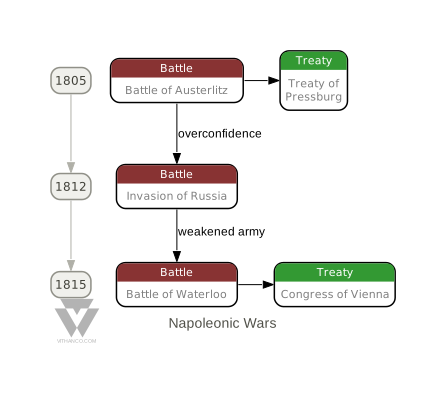
This example shows all three concepts working together:
- alignGroup pins battles and treaties to their year
- topToBottom layout makes time flow vertically
- Custom types (Battle, Treaty) with distinct colours and category labels replace the generic Event
Note that WarTimeline declares its own influenced edge type rather than reusing the built-in influence. That built-in runs from Event to Event, and Battle is a new node type, not an Event — so once you introduce custom node types you need custom edge types to connect them.
Try it Yourself
Edit the VGL below and click "Render" to see your diagram. Try changing the layout, adding new event types, or creating groups for tracks:
Tip: Use Ctrl+Enter (or Cmd+Enter on Mac) to quickly render your graph while editing.
Want to learn more about the VGL syntax? Check out the complete VGL Guide for detailed documentation on creating graphs in text format, including syntax reference and examples for all supported notations.