 Home
The best Tools for Structured Visual Thinking
Vithanco in Your Editor and Your AI Assistant
Home
The best Tools for Structured Visual Thinking
Vithanco in Your Editor and Your AI AssistantVithanco in Your Editor and Your AI Assistant
Estimated reading time: 2 minutes.
The Vithanco diagram engine no longer only lives in the Mac app. The same engine — the one that reads VGL, enforces each notation's rules, lays the graph out and draws it — is compiled to WebAssembly and shipped in four other places: two editor extensions, and two servers that let an AI assistant draw diagrams for you.
They all produce identical diagrams, because they are all the same engine.
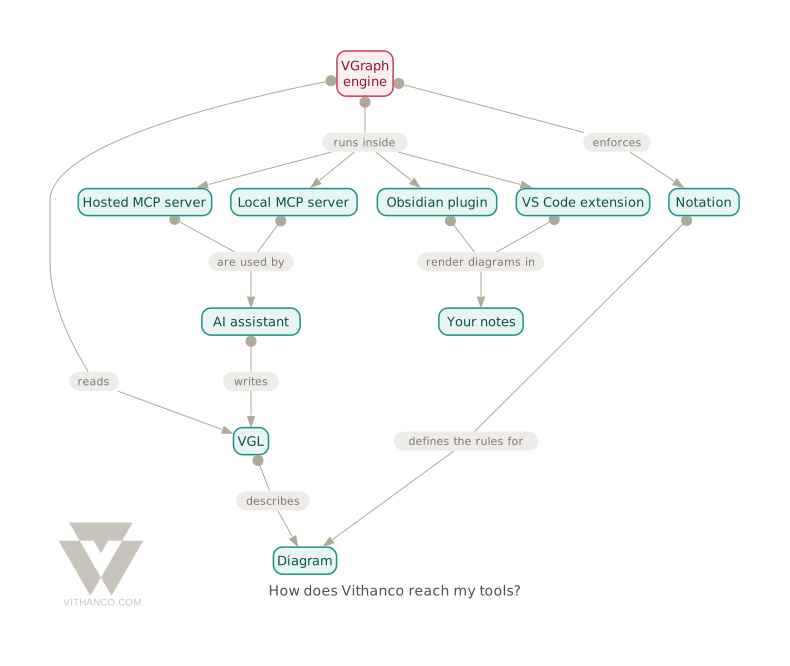
In your notes
A fenced code block tagged vgl becomes a rendered diagram. Your note keeps the text; the reader sees the picture.
- Obsidian — rendered in reading view.
- Visual Studio Code — rendered in the built-in Markdown preview.
Both work the same way and share three properties worth knowing:
Every notation. IBIS, Concept Map, Causal Loop Diagram, Timeline, Decision Tree, Goal Tree, Impact Mapping, Benefit Breakdown Structure, Attack-Defense Tree, and the full Theory of Constraints set — Current Reality Tree, Evaporating Cloud, Future Reality Tree, Prerequisite Tree, Transition Tree.
The rules, enforced. Each notation defines which node types may exist and which edges are legal between them. An invalid diagram is reported, not quietly drawn.
Nothing leaves your machine. The engine is embedded in the extension as WebAssembly. No server, no CDN, no network call, no "allow content" prompt — and it works on a plane.
From your AI assistant
AI assistants — an MCP server lets an assistant like Claude draw Vithanco diagrams as part of a conversation. Ask it to map a decision and you get the diagram back as an image, not a description of one.
It also learns the notation rather than guessing at it, and every diagram comes back with a critique it can act on.
Where to go next
- VGL Syntax Guide — the language all of these read.
- Notations — what each diagram type is for.
- The editor — try VGL in the browser, nothing to install.